When people say their phone’s internet is “slow,” they could mean several different things. A video that keeps buffering, a page that takes forever to load, a call that cuts in and out, and a download that crawls can all be described the same way but have different causes. The terms that explain them- bandwidth, speed, and latency- get mixed up constantly, even in carrier ads.
This guide breaks down what each term means, how they work together, what typical 4G and 5G numbers look like, why your results vary, how to test your connection properly, and what to expect from a prepaid plan like Infimobile.
Table of Contents
- Short-answer
- Bandwidth: The Size of the Pipe
- Speed
- Latency
- Jitter and Packet Loss
- Together
- Numbers
- Variation
- Speed-vs-data
- Testing
- How to Get a Better Experience
- Mobile Data and Infimobile
- Faqs
The Short Answer
Here are the key terms in one table:
| Bandwidth | The maximum amount of data a connection can carry | Mbps | The number of lanes on a highway |
| Speed (throughput) | The data actually delivered to your device | Mbps | How fast traffic is really moving |
| Latency | The delay before data starts to arrive | Milliseconds (ms) | The time it takes a car to reach its destination |
| Jitter | How much latency varies from moment to moment | ms | Stop-and-go traffic |
| Packet loss | The share of data that never arrives | Percent | Cars that never make it |
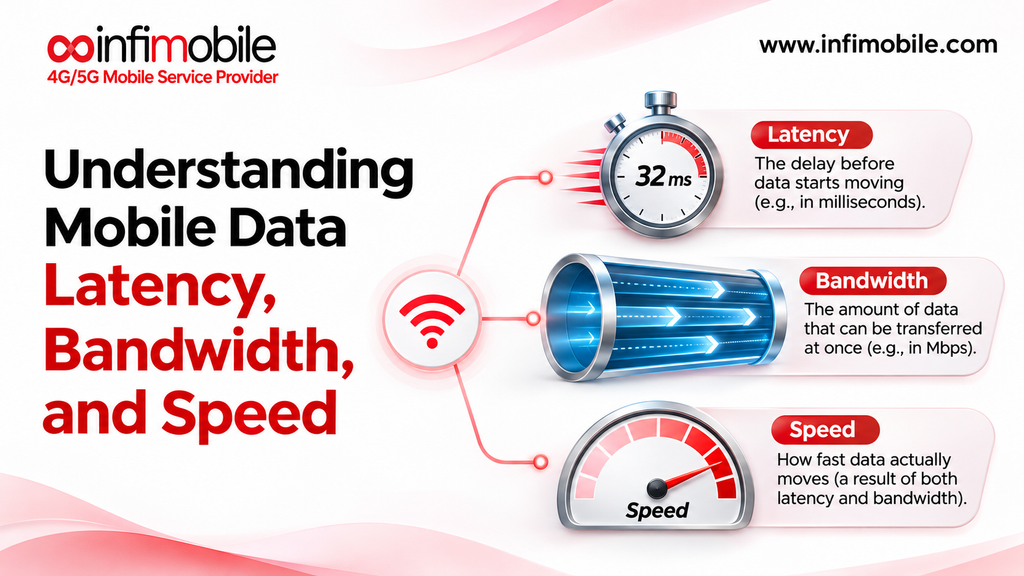
In one sentence: bandwidth is capacity, speed is what you actually get, and latency is how responsive the connection feels. A connection can have lots of bandwidth and still feel sluggish if latency is high, and it can have low latency but be too narrow for streaming video.
Bandwidth: The Size of the Pipe
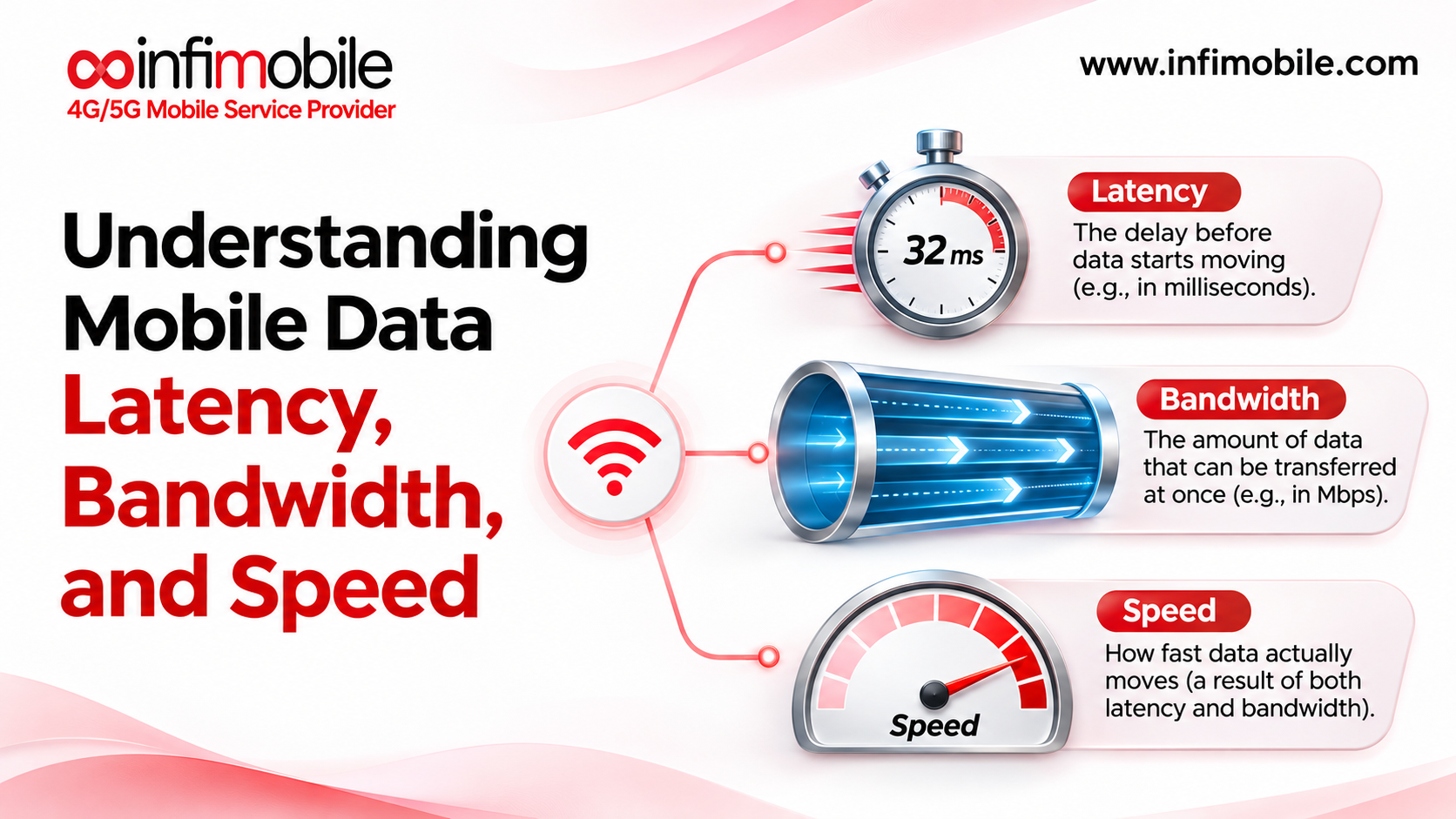
Bandwidth describes how much data a connection can carry at once. It’s measured in megabits per second, written Mbps. More bandwidth means a wider pipe, so more data can flow at the same time.
Two details trip people up:
- Bits and bytes are different. Connection speeds use megabits per second (Mbps), while file sizes use megabytes (MB). There are 8 bits in a byte, so a 100 Mbps connection can move at most about 12.5 megabytes per second under ideal conditions.
- Download and upload are separate. Download is data coming to your phone, like streaming or browsing. Upload is data going out, like sending a video or being seen on a video call. Mobile networks typically offer more download capacity than upload, which is why upload can be the bottleneck on calls.
Bandwidth is often the marketing number, but it’s the maximum the network could carry, not a promise of what you’ll see at a given moment.
Speed: What You Actually Experience
When people say “speed,” they usually mean throughput: the data your phone actually receives per second under real conditions. It’s the number a speed test reports.
Throughput is almost always lower than the theoretical maximum because it depends on factors like signal strength, distance from the tower, how many other people are using the network, and the quality of the connection to the servers you’re reaching.
Here’s a simple example of why it matters. Under good conditions, downloading a 1GB file at 40 Mbps takes roughly three to four minutes. At 10 Mbps, it takes more than 13 minutes. Speed determines how long big transfers take and how much video quality your connection can sustain.
Latency: The Delay
Latency is the time it takes for data to travel from your phone to a server and back, measured in milliseconds. It’s often called ping. Where speed tells you how much data flows, latency tells you how long you wait for the first data to arrive.
Low latency makes a connection feel snappy: pages start loading right away, taps respond quickly, and conversations flow naturally. High latency makes everything feel laggy, even with large bandwidth. Imagine a highway with many lanes but a very long route: lots of cars travel at once, but each takes a long time to arrive.
Latency matters most for real-time activities:
- Voice and video calls. Industry guidance such as the ITU’s recommends keeping one-way delay under about 150 milliseconds for natural conversation.
- Online gaming and cloud apps. Lower is better, since delays affect how quickly your actions register.
For buffered video, like streaming a movie, a bit of latency usually isn’t noticeable, because the player downloads ahead of what you’re watching.
Jitter and Packet Loss
Two other measurements often explain why a call sounds choppy even when speeds look fine.
Jitter is variation in latency. If delays are 30 ms, then 80 ms, then 25 ms, audio and video arrive unevenly, which causes glitches. Video call guidance commonly suggests keeping jitter under about 30 ms.
Packet loss is the percentage of data that never arrives and has to be resent or skipped. Even a little can cause freezing or garbled audio on calls, and a common rule of thumb is to keep it under about 1%.
Many speed tests report ping and jitter, which makes them useful for diagnosing call problems.
How They Work Together
No single number tells the whole story. What matters depends on what you’re doing:
| Streaming video | Throughput (download) | A video buffer hides small delays |
| Downloading files and updates | Throughput | Bigger pipe, faster downloads |
| Video calls | Upload speed, latency, jitter | Upload is often the limit |
| Voice calls and VoLTE | Latency and packet loss | Needs little bandwidth |
| Online gaming | Latency and jitter | Needs little bandwidth |
| Web browsing | Both | Latency affects how quickly pages start loading |
| Using your phone as a hotspot | Throughput, shared by every device | More devices split the same capacity |
This explains why two people on the same network can have very different experiences. One might stream HD video easily but struggle on video calls because of upload speed or jitter.
Typical Real-World Numbers
Numbers vary widely by location, time, device, and network. Third-party measurements and industry guides generally show ranges like these, which should be treated as rough guides, not guarantees:
| Typical download | Roughly 20 to 50 Mbps | Often a few hundred Mbps on mid-band, lower where only low-band 5G is available |
| Typical latency | Roughly 30 to 50 ms | Often around 20 to 50 ms in real-world tests |
| Upload | A few to 10 Mbps or more | Often higher, but varies widely |
The extremely low latency figures sometimes quoted for 5G, such as 1 millisecond, are design targets for specialized uses, not what most people see on a phone.
And here’s roughly what common activities need:
- HD video streaming: around 5 Mbps per stream, according to Netflix’s recommendations.
- 4K video streaming: around 15 Mbps per stream, according to Netflix.
- HD video calls: around 3 Mbps down and 3.8 Mbps up for a one-to-one HD Zoom call, per Zoom’s published requirements as widely reported.
- Voice calls: very little, typically around 100 kbps.
- Web browsing, maps, and messaging: modest amounts, though latency affects how quick they feel.
Most everyday activities fit comfortably within typical 4G and 5G speeds. Problems usually appear when the signal is weak, the network is congested, or you’re doing several demanding things at once.
Why Your Mobile Speeds Vary
If your speed test results jump around, you’re not imagining it. Mobile speeds change because of:
- Signal strength. The stronger your signal, the more reliably the network can use faster modulation and more capacity.
- Distance and obstacles. Walls, basements, hills, and buildings weaken signals.
- Network layer. Low-band spectrum reaches far but is slower, while mid-band and high-band offer higher capacity over shorter distances.
- Congestion. When many people share a tower, each gets a smaller slice, especially at peak times and in crowded places.
- Priority rules. Host networks typically prioritize their own customers during congestion, so customers of a mobile virtual network operator, or MVNO, can see slower data in crowded places at peak times.
- Your phone. Older devices without support for newer bands may not reach the fastest speeds.
- Your plan. Some plans reduce speeds after you’ve used a set amount of high-speed data.
- The destination. Speeds also depend on the server you’re connecting to.
Speed vs. Data: Two Different Things
One of the most common mix-ups is confusing speed with data allowance.
- Speed is how fast data moves, in Mbps.
- Data is how much data you use over time, in gigabytes.
A fast connection doesn’t mean you’ll use more data; it means you can move it more quickly. And a plan’s data allowance doesn’t tell you how fast your connection is. Streaming an hour of HD video uses a certain amount of data whether your connection runs at 20 Mbps or 200 Mbps, though faster connections let the video reach higher quality, which can use more.
This distinction matters for prepaid plans. Many plans, including Infimobile’s, include a monthly amount of high-speed data. After you use it, speeds are reduced for the rest of the monthly cycle instead of you being charged overage fees. So when you hit your allowance, it’s your speed that drops, not your access.
How to Test Your Connection Properly
A single speed test can be misleading. For useful results:
- Turn off Wi-Fi, so you’re testing cellular, not your home internet.
- Use a reputable speed test app or website, and note download, upload, and ping.
- Test several times, at different times of day, including busy hours, and where you actually use your phone.
- Note the network icon, such as LTE or 5G, and your signal strength.
- Restart or toggle airplane mode if results look unusually low, then test again.
- Compare with your needs, not with the biggest advertised number. If your results meet the requirements for what you do, the connection is doing its job.
How to Get a Better Experience
A few habits can help:
- Move to a better spot. Near a window or outdoors often improves signal.
- Use Wi-Fi when it’s available, especially for large downloads and updates.
- Turn on Wi-Fi calling for better calls indoors.
- Keep your phone updated, since updates sometimes include network improvements.
- Download before you go. Save music, maps, and shows over Wi-Fi.
- Limit simultaneous heavy use, such as streaming while others use your hotspot.
- Choose the right network and plan for where you live, and check coverage before you commit.
Mobile Data and Infimobile
Infimobile is a mobile virtual network operator that runs on the Verizon and T-Mobile networks, with network availability varying by plan. Its plans are listed as 5G and 4G LTE. A few things follow from that:
- Your speeds come from the host network. Infimobile doesn’t operate the radio network, so bandwidth, latency, and speed depend on the host network’s coverage, your location, your phone, and congestion.
- The plan listings don’t promise a specific speed. After you use your plan’s high-speed data, speeds are reduced for the rest of the monthly cycle, and the listings describe this without naming a number.
- Congestion can slow MVNO data. As with any prepaid MVNO plan, data can occasionally be slowed during heavy network congestion.
- Hotspot shares your connection. Some plans include hotspot, and others offer it as an add-on, and everything connected shares the same throughput.
Here are Infimobile’s 12-month plans as listed at the time of writing. Prices and promotions change, so confirm current details at infimobile.com/plans:
| 10GB Unlimited | $75 | Unlimited talk and text, 10GB of 5G/4G data |
| 20GB Premium | $120 | Unlimited talk and text, 20GB of 5G/4G data |
| Freedom Unlimited | $150 | Unlimited data, speeds reduced after 40GB |
To check what to expect before you buy, use the coverage and compatibility checker at infimobile.com/compatible, make sure your phone is unlocked and supports 5G or 4G LTE and VoLTE, and consider Infimobile’s trial port-in option, which lets you test service on a temporary number and run your own speed tests. Infimobile states its plans are non-refundable, so testing first is wise. Support is available at +1 (855) 484-1855 or at support@infimobile.com.
Frequently Asked Questions
Bandwidth is the maximum amount of data a connection can carry, like the number of lanes on a highway. Speed, usually measured as throughput, is the data you actually receive under real conditions. Speed is almost always lower than the theoretical maximum.
Latency is the delay before data arrives, measured in milliseconds. Lower is better. For voice and video calls, guidance suggests keeping one-way delay under about 150 ms. On mobile networks, real-world latency is often in the tens of milliseconds.
Mobile speeds change with signal strength, location, time of day, network congestion, your phone, and the server you test against. Test several times, at different times and places, to get a realistic picture.
As a rough guide, Netflix recommends about 5 Mbps for HD streaming and about 15 Mbps for 4K, and about 3 Mbps down and 3.8 Mbps up for a one-to-one HD Zoom call. Most typical 4G and 5G connections meet these needs when the signal is good.
Infimobile’s plans are listed as 5G and 4G LTE, but actual speeds depend on the host network, your location, your phone, and congestion. Check coverage at infimobile.com/compatible, and consider a trial port-in to test real-world performance before moving your number.
Bandwidth, speed, and latency each tell part of the story, and the best way to judge your connection is to match the numbers to what you actually do on your phone. To check your phone and coverage, visit infimobile.com/compatible and see current plans at infimobile.com/plans.